


Genspark AI is an integrated artificial intelligence platform designed for users to conduct research, generate content, investigate, and finish diverse tasks. Many AI features are available from a single platform, rather than having to rely on separate software for every use, such as a document, research, image, video, spreadsheet, or presentation. Genspark features Super Agent, AI Chat, AI Slides, AI Sheets, AI Docs, AI Image, AI Video, Deep Research, Fact Check, and Meeting Notes. It also supports multiple AI models and allows you to choose the right model for the appropriate task. This article will provide complete information about Genspark AI.
What is Genspark AI?
Genspark AI is a generative AI workspace featuring an innovative solution that allows users to easily complete tasks without just answering questions. The Super Agent can divide tasks into several steps, utilize various AI models and tools, carry out research, and deliver a complete result. Users can manipulate documents, spreadsheets, presentations, images, video, and more. They can also share their own files with Genspark for analysis, summarisation, organisation, and/or transformation. The platform integrates several AI features into a single workspace that allows users to perform multiple aspects of a project workflow in a single application.
Key Features of Genspark AI
Genspark AI is an AI workspace/agent tool. Not only can it answer your questions, but its various tools can research, analyze, write, create slides, work with documents, and complete tasks.
- Super Agent: Genspark has an autonomous agent that can take your prompt and think of ways to complete your task. It can research, analyze, write, and complete your task.
- Multi-Model AI: Genspark allows you to use multiple AI models. It also uses a mixture of agents approach for certain tasks.
- AI-Powered Research: Can research the web and pull information from multiple sources. It can then analyze and create something helpful with that information.
- AI Slides: Can research and create slides for you. You can edit pieces of the slide deck and export as a PPTX or PDF.
- AI Sheets: Can research and organize data. It can also calculate and analyze information. Create graphs that can be exported as an xlsx file.
- Documents and File Support: If you have a document or file that you want to work with, you can upload it to Genspark, and it can use that information to help you.
- Content Creation: Genspark can write for you. It can also work with documents, images, video, slides, sheets, and code.
- Custom Skills and Workflows: If you have a workflow that you want to save as a skill, you can do that. This can come in handy if you need to do a task over and over.
- Integrated Workspace: Instead of having to use multiple platforms to research, create slides, work with sheets, documents, images/video, and code. Genspark does all of this for you.
Genspark AI can help you with many tasks that require more than just a chatbot.
How to use Genspark AI
- Step 1: Create an Account. Log in to Genspark and sign up. There are some users prefer to get a hold of the free plan and find out whether they require a paid subscription or not.
- Step 2: Select an AI Tool. Once logged in, select the tool based on the task you are trying to accomplish. They come equipped with AI Chat, AI Super Agent, AI Slides, AI Sheets, AI Docs, AI Image, AI Video, and research tools.
- Step 3: Type Your Prompt. Talk about what you’d like Genspark to do!
- For example: Produce a 10-slide presentation on the future of AI in education and include the following: major trends, statistics, benefits, challenges, etc., and a conclusion.
- Step 4: Upload Files. If needed, make additions to it by uploading extra info, such as a document, spreadsheet, presentation or other files. You may submit a PDF of your research material, for instance, and request that Genspark transform that information into a presentation.
- Step 5: Read the result. After Genspark has finished the job, conduct a review of the information generated and make as many changes as necessary.
- Step 6: Edit and Export: Look at the result and, if necessary, edit the content and export it to the desired format.
Genspark AI Pricing in 2026
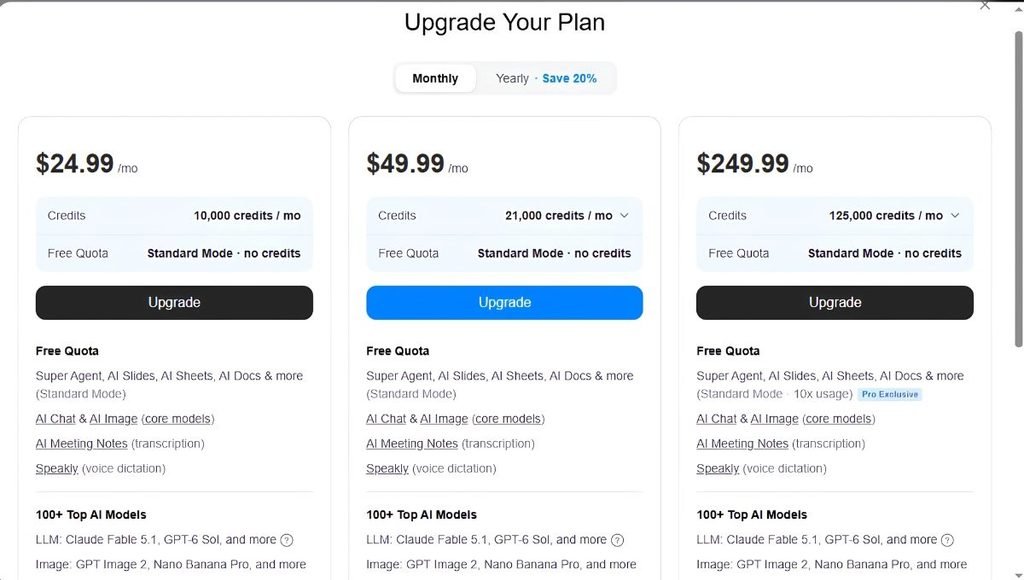
Genspark currently offers Free, Plus, and Pro plans for individual users. Pricing can change based on billing options, promotions, taxes, and regional conditions.
| Plan | Monthly Price | Credits | AI Drive | Main Features |
| Free | $0 | 100 credits/day | 1 GB | Basic AI access |
| Plus | $24.99/month | 10,000/month | 50 GB | Advanced AI tools and features |
| Pro | $249.99/month | 125,000/month | 1 TB | High-volume professional usage |
Annual billing can reduce the effective monthly price. The Plus annual plan is listed at around $19.99 per month when billed annually, while the Pro annual plan is listed at around $199.99 per month.
The final price can vary because of taxes, regional pricing, and promotional offers.
Genspark Free vs Plus vs Pro
| Feature | Free | Plus | Pro |
| AI Chat | Limited | Yes | Yes |
| Super Agent | Limited | Yes | Yes |
| AI Slides | Limited | Yes | Yes |
| AI Sheets | Limited | Yes | Yes |
| AI Docs | Limited | Yes | Yes |
| AI Image | Limited | Yes | Yes |
| AI Video | Limited | Yes | Yes |
| Credits | 100/day | 10,000/month | 125,000/month |
| AI Drive | 1 GB | 50 GB | 1 TB |
| Commercial Use | Limited | Yes | Yes |
| Advanced Models | Limited | Yes | Yes |
| High-Volume Usage | No | Moderate | Yes |
Genspark offers a limited number of uses for some tools. Details and boundaries may vary with revisions to plans.
Genspark AI Slides
AI Slides is a significant productivity tool from Genspark. Can take an idea and turn it into a whole presentation. For instance, when making a presentation on the subject of AI, you can give the topic and tell Genspark how many slides are required.
It can then lay out the content, design the slides, put in pictures, and build a presentation. Users can also upload existing documents and ask Genspark to use the information to create slides. AI Slides can be helpful in the following situations:
- College presentations
- Business presentations
- Sales decks
- Marketing presentations
- Research presentations
- Training materials
- Project reports
- Educational slides
Who Should Use Genspark AI?
- Students: Genspark AI can be used by students for research, presentations, study notes, summaries, and project work.
- Content Creators: It’s great for YouTubers, bloggers, and social media creators for content ideas, research, scripts, images, and videos.
- Marketers: Marketers can utilize Genspark for content development, presentations, campaign ideas, competitor analysis, and data analysis.
- Researchers: It offers researchers research tools for gathering, structuring, and analysing information from various sources.
- Business Professionals: Genspark allows professionals to generate reports, presentations, documents, spreadsheets, and business research.
- Entrepreneurs: It can be used by entrepreneurs for their market research, business ideas, analysis of their competitors, business planning, and marketing materials.
- Designers: It integrates AI image and creative tools for designers to create images, illustrations, and marketing graphics.
- Small Businesses: Genspark is ideal for small enterprises to generate business documents, presentations, marketing materials, and more, without needing to use numerous AI tools.
Genspark AI vs ChatGPT

| Feature | Genspark AI | ChatGPT |
| AI Chat | Yes | Yes |
| Deep Research | Yes | Yes |
| AI Images | Yes | Yes |
| AI Video | Yes | Available through supported tools |
| AI Presentations | Yes | Available through supported workflows |
| AI Spreadsheets | Yes | Available through supported tools |
| AI Documents | Yes | Yes |
| Multiple AI Models | Yes | Primarily OpenAI models |
| AI Agents | Yes | Yes |
| Browser Automation | Yes | Available through supported capabilities |
| All-in-One Workspace | Strong focus | Broad AI ecosystem |
| Free Plan | Yes | Yes |
Pros and Cons of Genspark AI
| Pros | Cons |
| Multiple AI tools in one platform | Advanced usage can consume credits quickly |
| Access to multiple AI models | Some features have usage limits |
| AI Slides can create presentations | Large projects may require more credits |
| Useful research tools | AI-generated information requires verification |
| AI image and video features | Higher plans can be expensive |
| Supports documents and spreadsheets | Features can change as the platform develops |
| Free plan available | Advanced features are concentrated in paid plans |
| Useful for content creation | Beginners may need time to learn all the tools |
Is Genspark AI Free?
Yes. Genspark offers a free plan with limited usage of its AI capabilities. The free plan has daily credits available and a certain amount of cloud storage. Users can upgrade to a paid plan for more credits, advanced AI models, increased storage, and more features. The free plan can be helpful to try out the platform before deciding on subscription requirements.
Genspark Super Agent
Super Agent is created for tasks that involve several steps.
Rather than having to ask students to do multiple tasks, like “research this topic,” “analyze the information,” and “make a presentation,” users can simply state the finished objective. The agent will then be able to schedule the workflow and run it with any tool. This can be helpful if a project is more involved and includes research, writing, data analysis, and content creation components, and when working on larger projects.
Conclusion
Genspark AI is a comprehensive artificial intelligence platform, encompassing AI chat, AI Super Agent, AI research, AI presentation, AI document, AI spreadsheet, AI image, AI video, AI meeting notes, and more. Its main aim is to finish complex tasks and complete deliverables. AI Slides can be used to make presentations, AI Sheets can work on structured data, AI Docs can help to create documents and Super Agent can coordinate more complex workflows.
Genspark offers a Free plan for those interested in testing its features, and Plus and Pro plans offer significantly higher credits, storage, and enhanced features.
Genspark can serve as a central hub for AI functions for students, content creators, researchers, marketers, professionals, and businesses. Users will need to check out key details; however, watch their credits and compare the newest features of the plans before they make a purchase.
FAQs
A1. Genspark AI is an AI workspace with all tools in one place: chat, research, presentations, documents, spreadsheets, images, videos and AI agents.
A2. Yes. The plan offers Genspark for free and includes limited access to select AI features with limited daily credits.
A3. Currently, the Plus plan is offered for $24.99 monthly on a monthly basis. Consider an annual billing plan and see how it lowers the monthly fee.
A4. Yes. Genspark AI Slides can generate presentations and save them in various formats like PPTX and PDF.
A5. Genspark Super Agent can perform multi-step tasks, including planning workflows, leveraging AI models and tools, conducting research, handling files, and generating end-to-end results.
Also Read: Is HeyGen the Best AI Video Generator? Features, Pricing, and Verdict